
The King’s Company
Kingdom-minded software for creative and anointed business leaders who love what they teach — and are ready to finally reach the people it’s for.
The work doesn’t have to be the pain between the calling and the launch. This platform builds it for you, in one place instead of six.
You already know what you are supposed to build. A course, a school, a cohort, a book, a conference, a discipleship track that finally gets written down and delivered. This is where it gets built — and then named, made ready, carried to the people it was meant for, delivered to them properly, and kept running once they are in.
Seven phases that carry a build from a rough idea to a launched thing people are actually engaging with. There is an agent on the inside that can read the work you already have — your notes, journals, docs, files, or scribbled ideas — so when you ask it what to do next, it answers about your build. Your process.
This isn’t a system you have to learn. It’s a system that learns you, and builds around your identity, your calling, your mission and your fivefold mandate.
That’s two weeks to prove to yourself that you will actually use it. And we pay for your assistant while you do — which is not cheap, but we would rather invest in you first. Nothing is charged for 14 days, and you cancel from inside the platform in two clicks: no email, no phone call.
Do you ever feel like most of what God gives you to build never reaches anybody?
It is almost never because the teaching was weak. It is that the distance between a finished idea and an enrolled person is made of a hundred small jobs you were probably never called to do — writing the outline, naming the offer, building the pipeline and the plan to grow it, settling on a price or an investment, building a list, writing the emails, scheduling the calls, handling the clients and students, and keeping people all the way through to the end.
In the same way a pastor should not wear every hat in the church, you cannot be expected to master literally all of it. So we built a tool that builds things with you, and for you — for about $2.50 a day on the solo plan.
Those jobs normally live in six different tools that know nothing about each other. Your outline is in one place, your people in another, your emails somewhere else, your payments somewhere else again.
Or maybe you mastered Zapier, Make and n8n — and then found yourself so caught up in the tech that you stopped slowing down to process your heart. Either way you are stuck: nothing you have built carries context across the gaps, so the work stalls somewhere in the middle and quietly dies there, usually right after the hard creative part is finished and just before anyone ever sees it.
If that is you, you are not behind and you are not bad at this. You have been doing the work of six people with the tools of six companies.
Simply put: this is not the most incredible CRM ever known to man. It is the right system for somebody with more revelation than they can keep up with and a calling to teach, preach, minister and change something in the earth through the work they do. It puts every one of those jobs under one roof, in the order they actually happen, and keeps track of where you stopped.

How it works
Seven phases to think it through — then it gets built.
A Build is the unit of work here. It might be a twelve-week discipleship course, a leadership cohort, a book with a launch behind it, a school, or a conference. Whatever it is, it moves through the same seven phases in the same order, and the platform always knows which one you are standing in — what has been decided, what is still open, and what needs to be true before the next one is worth starting.
But the phases are the thinking, not the work. Once they have given you the shape of the thing, the Blueprint lays out every piece it actually needs — the modules, the workbook, the lead magnet, the nurture emails with their timing, the call script, the follow-up — drawn from what you decided, on a canvas you can move around.
Then the Workshop writes them, one at a time, with the agent beside you holding the whole plan in its head. That is the part almost nobody gets through on their own, and it is where the assessment pages, the landing pages, the automation sequences and the branded workbooks stop being a list of things you ought to do and start being things that exist.
You are never staring at an empty screen wondering what the next move is.
Clarify
What you’re building, for whom, and what changes for them.
Before format, price, or platform: the assignment itself. Most builds fail here, quietly, by picking a vehicle before the thing it carries is clear. Slow down for this one.
Position
The offer: promise, format, price, and where it sits.
Turn the assignment into something a person can say yes to. The format, the length, the price, what’s included, and the promise you’re making. This is the paragraph on the sales page.
Produce
The content itself.
Curriculum, sessions, teaching, workbook — the thing they’re paying for. Draft to eighty percent and ship; the last twenty comes from delivering it to real people.
Package
Docs, workbooks, delivery structure, branded exports.
Make it deliverable. The welcome document, the workbook, the schedule, your name and mark on all of it. This is where it starts to look like a real product.
Pipeline
List, sequences, forms, and the call engine.
Where interest comes from and what happens to it. The list, the intake form, the email sequence — and the part that actually converts: a booked conversation, and the script for it.
Launch
The run: broadcasts, bookings, enrollment, close.
Open the doors. Announce it, book the calls, run them, follow up, enroll. Track every number, every day.
Operate
Deliver, retain, collect, learn.
This phase is the run, not the plan. Nothing here needs an answer the day it opens — it fills in as you deliver. Come back weekly, keep the numbers honest, and when it’s finished, close it out. The next build starts from what you learned here.
The seventh phase ends by naming the next build. That is deliberate — what you learn delivering one thing is the raw material for the next one, and it is the point at which most people lose the thread.
See it
This is the whole thing, screen by screen.
Real screens from the platform, in the order a build actually travels. The organization in these pictures is invented and so is everybody in it.
The seven phases
Think it all the way through first.
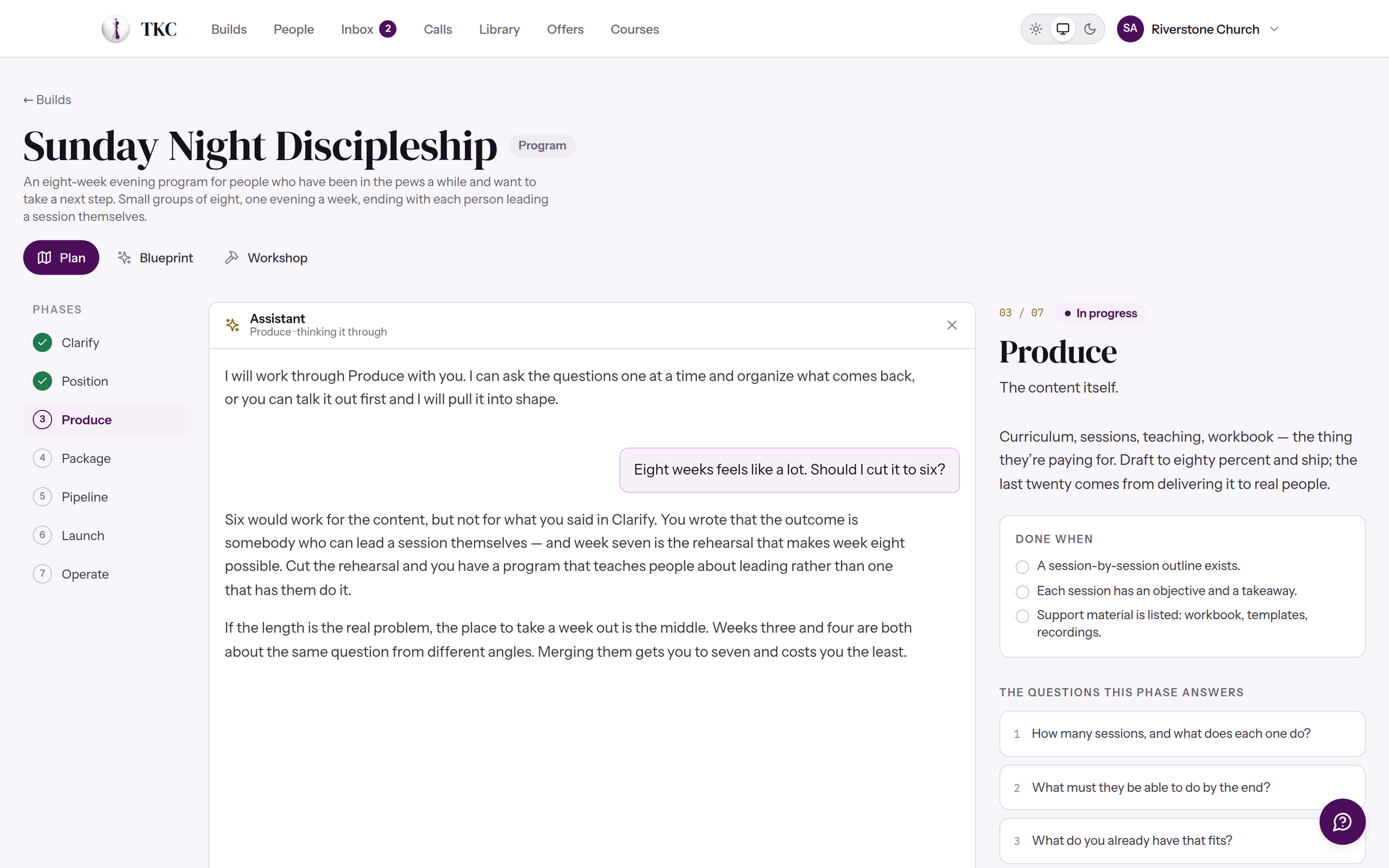
A build opens on its plan: the seven phases down the side, the questions for the one you are standing in, and the agent in the middle — which has read your outline, your notes and every decision you already made. It does not write instead of you. It asks the next question and drafts what you approve.
The blueprint
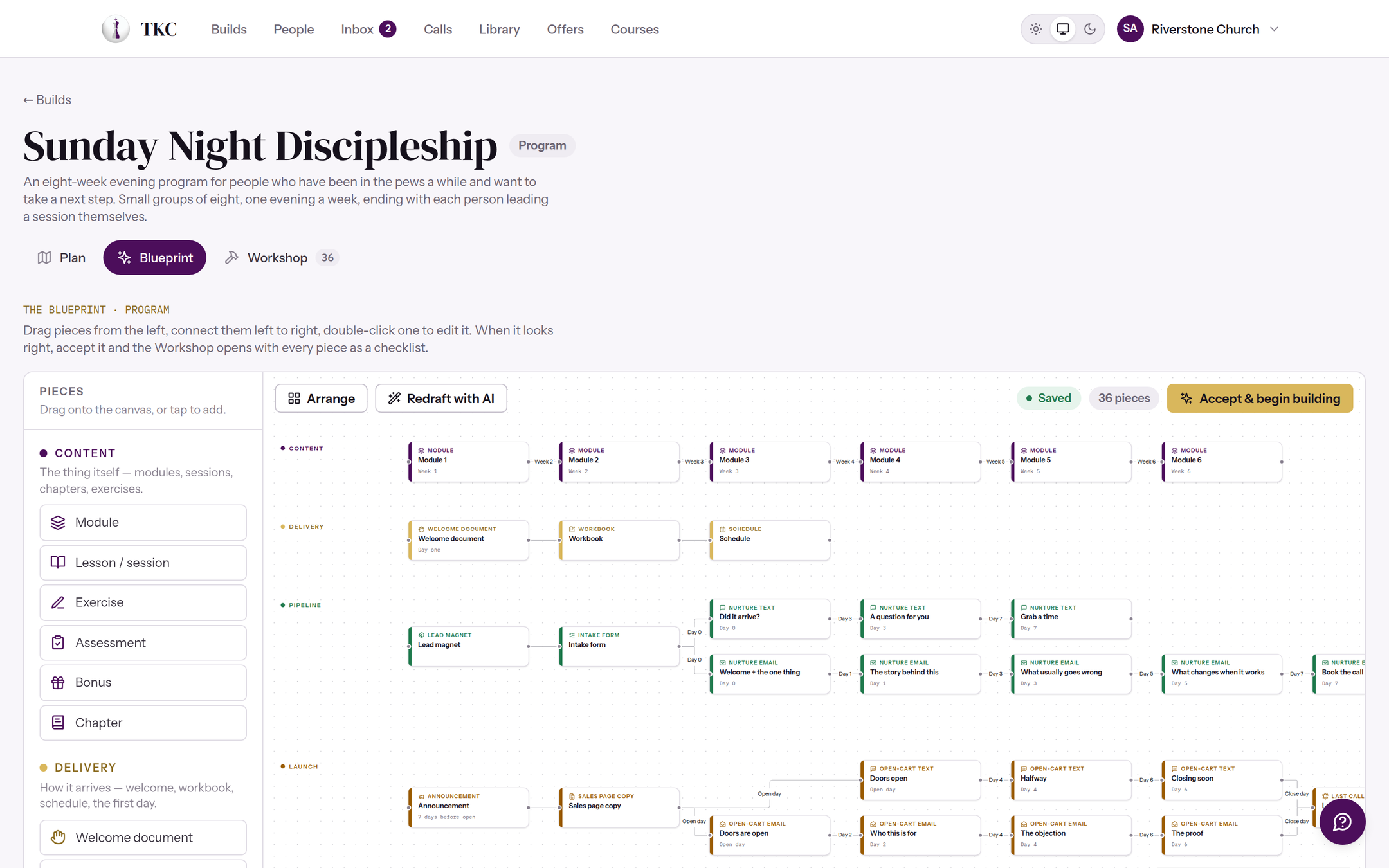
Then it lays out every piece you actually need.
The modules, the workbook, the lead magnet, the nurture emails with their timing, the call script, the follow-up — drawn from what you decided, on a canvas you can move around. This is the part most people never get to, because until now it meant knowing what a funnel is made of before you had ever built one.
The workshop
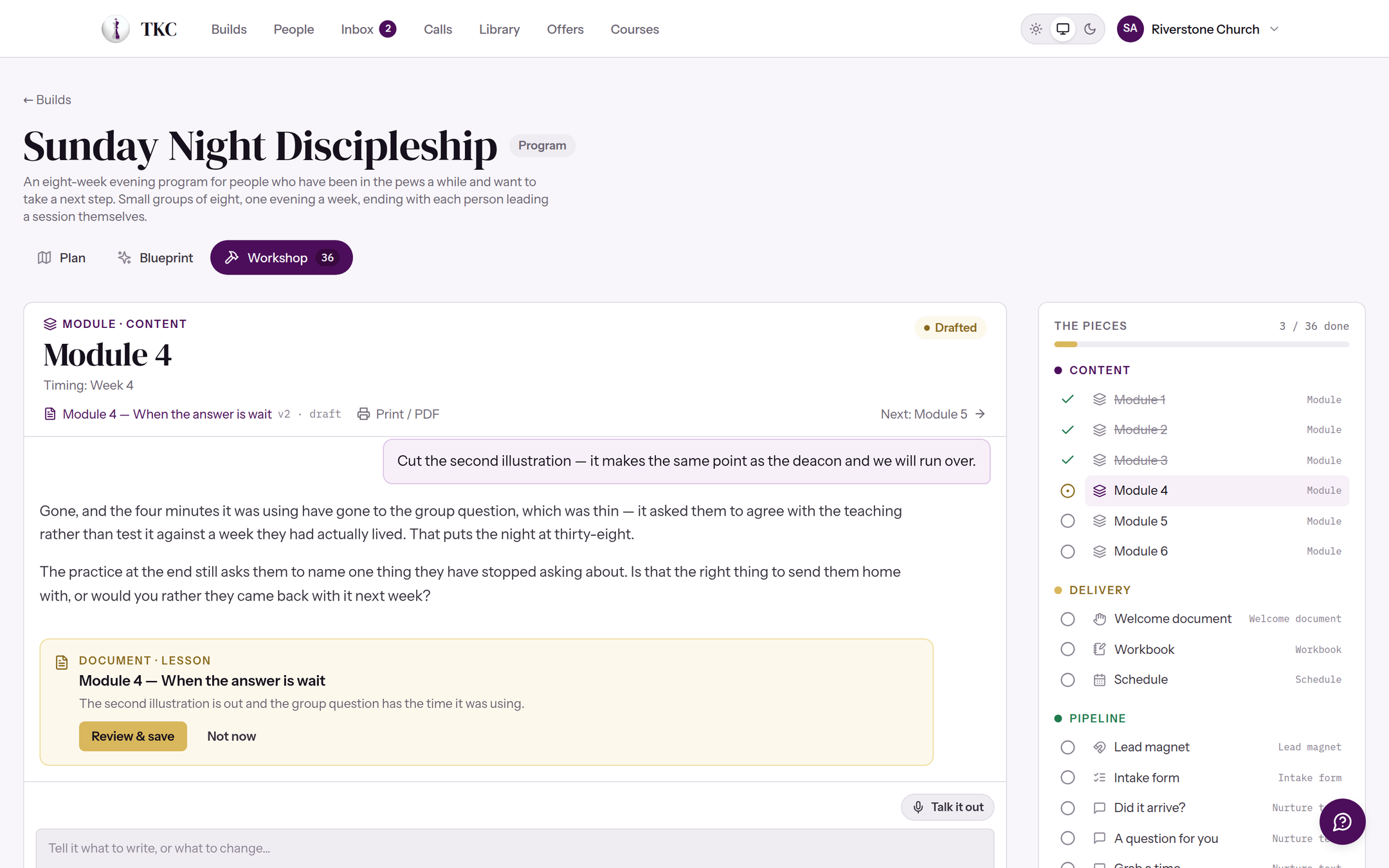
Then it writes them, one at a time, with you.
Every piece on the blueprint becomes a document, written beside an agent that is holding the whole plan in its head and has read everything you have written before. It sounds like you because it learned you.
Assessments and forms
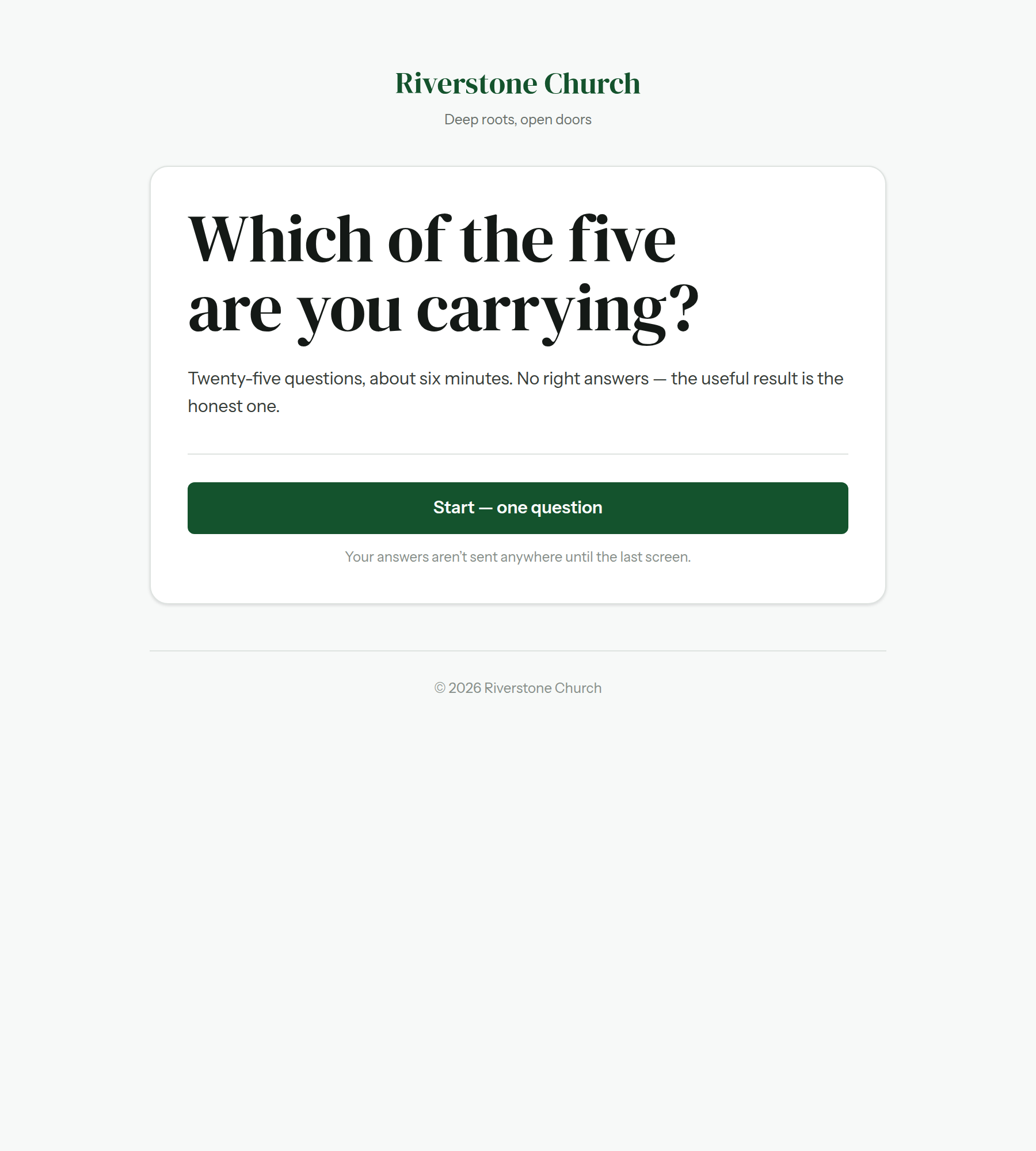
Give people a door they can walk through.
An assessment or a form, on a page in your colors, that a stranger can answer in two minutes. It scores them, shows them something worth reading about themselves, and they arrive on your list already tagged — with the follow-up running before you have opened your laptop.
People and calls
Know who you are actually talking to.
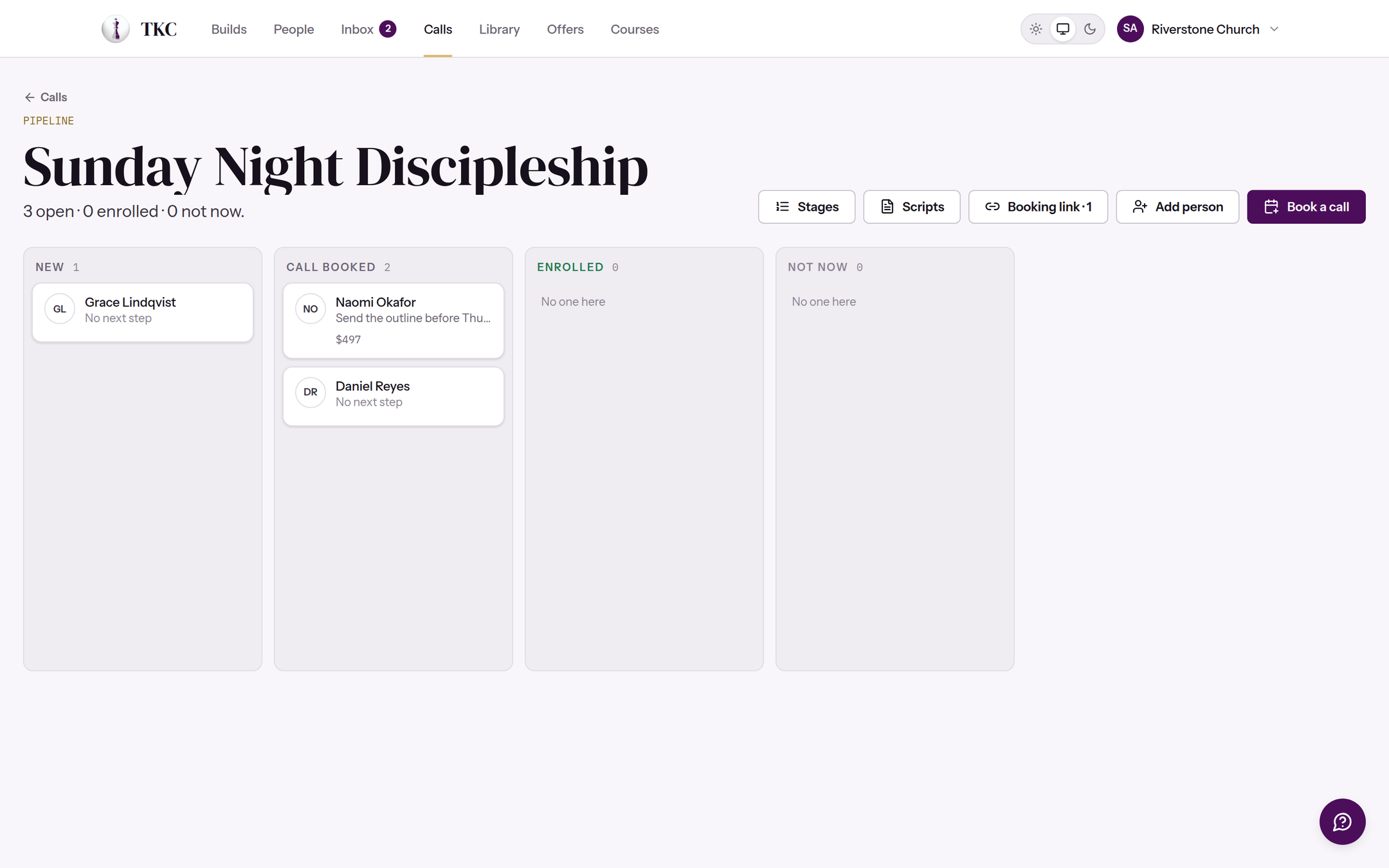
Everybody who answered, on a board, moving from a booked call through to being in. Their texts and emails are one thread, their calls are on the same card, and the agent sitting beside a call has read the person and the build before you dial.
Courses
Hand it over properly.
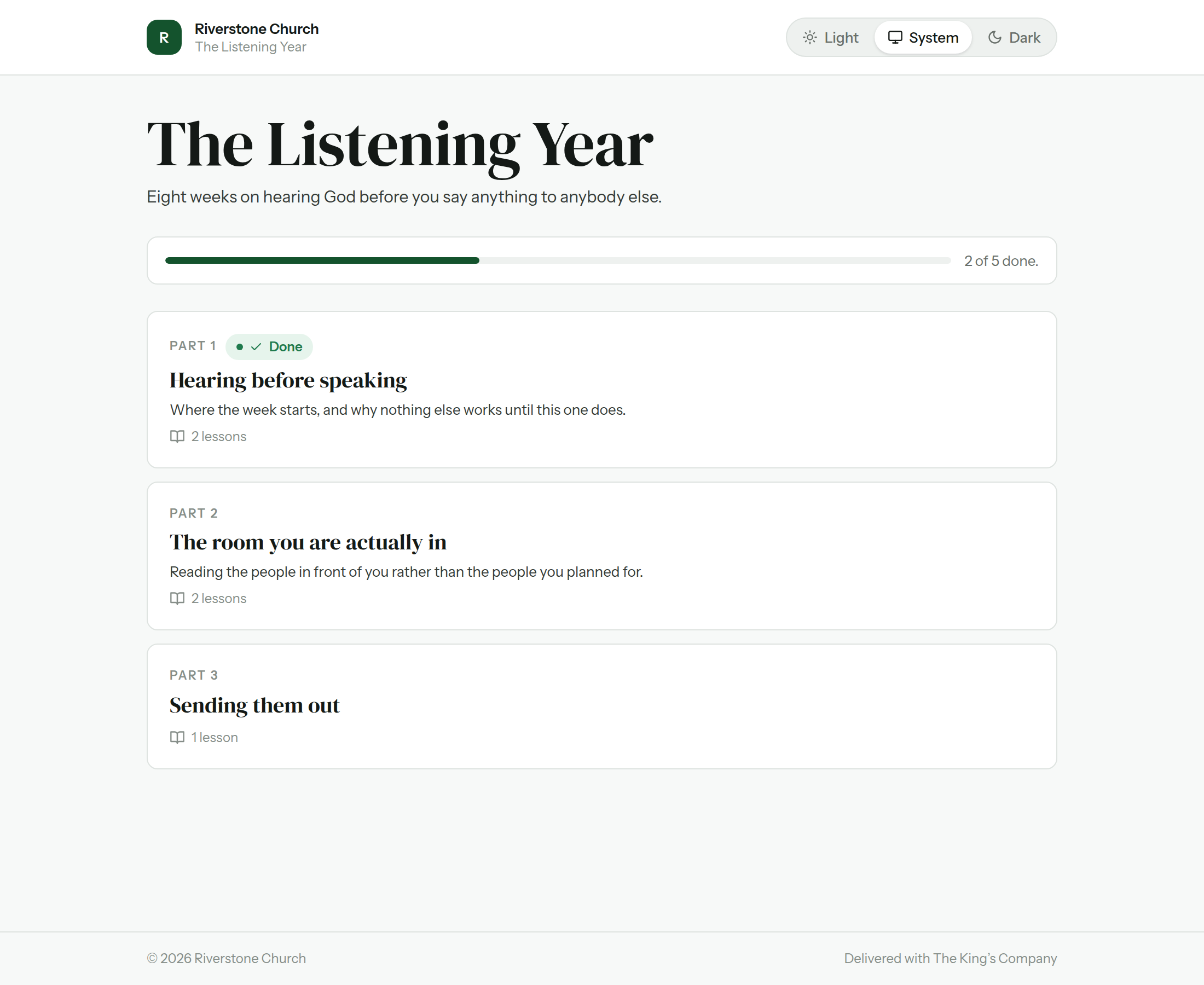
They sign in to something that is yours, not ours — your logo at the top and your color on every button they touch. Parts, lessons, the workbook they print, a place to ask questions. The only mention of this platform anywhere they can see is one quiet line at the very bottom.


What’s inside
Seven rooms, and they all know about each other.
This is the part no stack of separate tools can give you, and it is the reason a CRM was never the answer. Because the offer, the list, the messages, the calls and the money all live in the same place, a person’s history follows them everywhere — and the agent can tell you what is actually happening with a build instead of making you assemble the answer out of five dashboards at eleven at night.
Builds
The workspace for the thing itself. Each phase asks you the questions it exists to answer, holds your decisions where you can find them again, and turns them into the outline, the promise, the price, and the plan. Nothing is a blank document.
People
Every contact you have, in one list you actually own. Import a spreadsheet or a CSV out of whatever you used before, and from then on the platform tracks what each person has been sent, what they opened, which calls they took, and what they have bought from you.
Inbox
Email and text in one thread per person, so a conversation reads like a conversation. Send one message, send a broadcast to a segment, or build an automation that goes out over days — texts, emails, tags, a task for you — and stops the moment somebody replies or comes in.
Calls
For the work that still has to happen voice to voice. Book them, run them from a call room with the person’s whole history on screen, take notes while you talk, and move them along a pipeline you can see at a glance.
Library
Everything you write, kept together and kept branded. Workbooks, handouts, session guides, proposals — written in the platform and exported as clean Word files or print-ready PDFs on your own letterhead, in your own colors.
Offers
What people actually pay for. Publish a checkout page for a course, a cohort, or a payment plan; connect your own Stripe account so the money lands directly in your bank; and watch enrollments, payments, and outstanding balances without leaving the platform.
Courses
Where the people who bought it sign in and read it. A course is made from a build you have already written, not from scratch — modules, lessons, a discussion under each one, and progress you can see. Your logo at the top and your colors the whole way through, on every screen a student touches.
The front door
A page that turns strangers into people you know something about.
Make a short quiz — what kind of leader someone is, where they are stuck, what they have been carrying — and put the link wherever your people already are: a bio, a slide at the end of a talk, a group, an email signature. Or skip the result and make it a plain sign-up form. Either one takes about an hour, and you don’t write it on your own: the assistant drafts the questions, the results and the follow-up with you.
They get something worth their time
A page in your colors, your questions, and a result that sounds like you wrote it for them — because you did. It opens the moment they finish, at a link of its own they can send to a friend.
You get a person, not an email address
They land on your list already sorted: their result, and whatever else you asked — what they are building, how far in they are, what is in the way. Which means you can find everyone stuck at the same place and write to exactly them.
The follow-up is already running
A text within the hour, a few emails over the next week, a call if they go quiet. Written once, sent by itself, and it stops the moment somebody answers. You wake up to replies instead of a to-do list.
And when one of them comes in, they sign in to something that looks like yours — your logo at the top, your colors through every screen. The checkout runs on your own Stripe account, the handouts export on your letterhead, and the only place this platform is named anywhere a student can see is one quiet line at the very bottom.
The assistant
It doesn’t make you learn a system. It learns you.
A general chatbot can tell you how to price a course. It cannot tell you what your course should cost, because it has never seen your outline, your list, or what your people responded to last time.
The agent here sits inside your organization. Point it at the work you already have — the notes, the journals, the docs, the half-finished files, the ideas scribbled on the back of something — and it reads them. From then on it knows which build you are in and which phase, what you decided three weeks ago and why, who is on your list and how they responded.
So you can ask it to draft the launch emails and it writes them in your voice about your actual offer. Ask what is stalling the build and it looks. Ask who to call this week and it names people.
It builds around your identity, your calling, your mission and your fivefold mandate — which is the difference between a tool that gives advice and one that does the work with you.
Who it’s for
Built for people whose calling came with a to-do list.
Working on your own
You are the teacher, the marketer, the support desk and the person doing the books. Whether that is a church office or a business you built yourself, you do not need more software to manage — you need one place where the whole thing lives, so that finishing something is actually possible between everything else you carry.
A small team around you
Two to five people who each hold a piece of it. Everybody sees the same build, the same list and the same numbers, so the handoffs stop dropping and nobody has to ask where the current version lives.
A staff, and several things running
Staff and volunteers, several things running at once, and an audience big enough that sending carelessly has consequences. Everyone gets in, the history is kept, and the work does not walk out the door when somebody leaves.
Pricing
One price, everything included.
No feature held back for a higher tier and no charge per contact. What changes is how many people are working in it alongside you, and how much room the assistant has. Every one of them starts with 14 free days, and the assistant runs at full strength for every one of them.
Solo
$77/ month
$800 if you pay yearly
One minister, one build at a time. Everything the platform does, sized for a person.
Card required to start the trial, nothing charged until day 15. You can change plan, switch between monthly and annual, or cancel at any point from your own billing page. Selling through Offers uses your own Stripe account and the platform takes no percentage of what comes in.
Bring people with you
4 organizations you introduce, and yours is free.
Every organization you bring in earns you 25% of what they pay, every month, for as long as they stay. It comes off your own invoice first, so the number you watch is not a commission — it is how much of your own bill is already covered.
One level, and only one: you earn on the people you introduce, never on the people they introduce. There is no downline here and there is never going to be one. Nothing is capped, and you can stop reading now and never mention it again — the platform will not ask you twice.
You get a link the day you sign up. Anyone who starts a trial through it is yours, permanently — first touch wins, and it cannot be reassigned afterwards.
You earn on what somebody actually pays, so a trial earns nothing until it becomes a subscription. Money out only ever follows money in. That is what lets us leave it uncapped.
Straight answers
The questions people ask before they start.
What is this, in one sentence?
Kingdom-minded software you build your teaching inside — and then use to get it to the people it was meant for, and to actually deliver it to them.
This is not the most incredible CRM ever known to man, and it is not a course platform or an email tool either. Those are the pieces most people end up bolting together, and the bolting is where the work dies. This is the one place where the thing you are writing, the people you are writing it for, the conversations you have with them, and the way they finally receive it all know about each other.
Is this about making money off ministry?
It is about stewardship, and the distinction is worth making plainly rather than hedging.
Something you were given to teach does no good sitting in a folder. Getting it to the people it was meant for takes work that nobody is called to and everybody has to do — writing it down, telling people it exists, answering them, and handing it over in a way they can actually use. That work is what this carries.
Whether you charge for it is entirely your decision and the platform does not lean on it either way. You can run a build that is free from beginning to end. If you do charge, the money goes to your own account and this platform takes no percentage of it — we are paid by you, for the software, and by nobody else.
Do I need to be technical?
No. There is nothing to install, nothing to host and nothing to connect before you can start.
The one place people expect difficulty is payments, and that is a hand-off to Stripe that takes a few minutes — you fill in their form, not ours, and your card details never touch this platform at all.
I already have half of this somewhere else.
Most people do, and you do not have to move it all at once.
A build can be planned here while your list stays where it is; a course can be delivered here while your emails keep going out from wherever they go out from now. The parts that talk to each other are more useful together, but nothing refuses to work on its own.
Whose work is it?
Yours. What you write is yours, the people on your list are yours, and everything you have written stays readable and exportable whatever happens to your subscription.
The pages your students and your audience see carry your name, your logo and your color. The only mention of this platform anywhere a person you teach can see is one quiet line at the bottom of the page.
What does the assistant actually do?
It reads your work and asks the next question. It drafts — an outline, a lesson, a follow-up sequence, a workbook — and nothing it drafts is saved until you say so.
It cannot send anything, charge anybody or change your pages on its own. Every one of those is a thing you press.
